An error occurred in the Server Components render. The specific message is omitted in production builds to avoid leaking sensitive details. A digest property is included on this error instance which may provide additional details about the nature of the error.
Failed to load notebook details
1. Tutorial Introduction
DreamO is a unified image customization framework launched on May 12, 2025, by ByteDance in collaboration with the School of Electronic and Computer Engineering, Peking University Shenzhen Graduate School. Based on the DiT (Diffusion Transformer) architecture, the project integrates various image generation tasks, supporting complex functions such as character swapping (IP), face swapping (ID), style transfer, and multi-subject combination, achieving multi-condition control through a single model. Related research papers are available. DreamO: A Unified Framework for Image Customization .
This tutorial uses resources for a single card A6000.
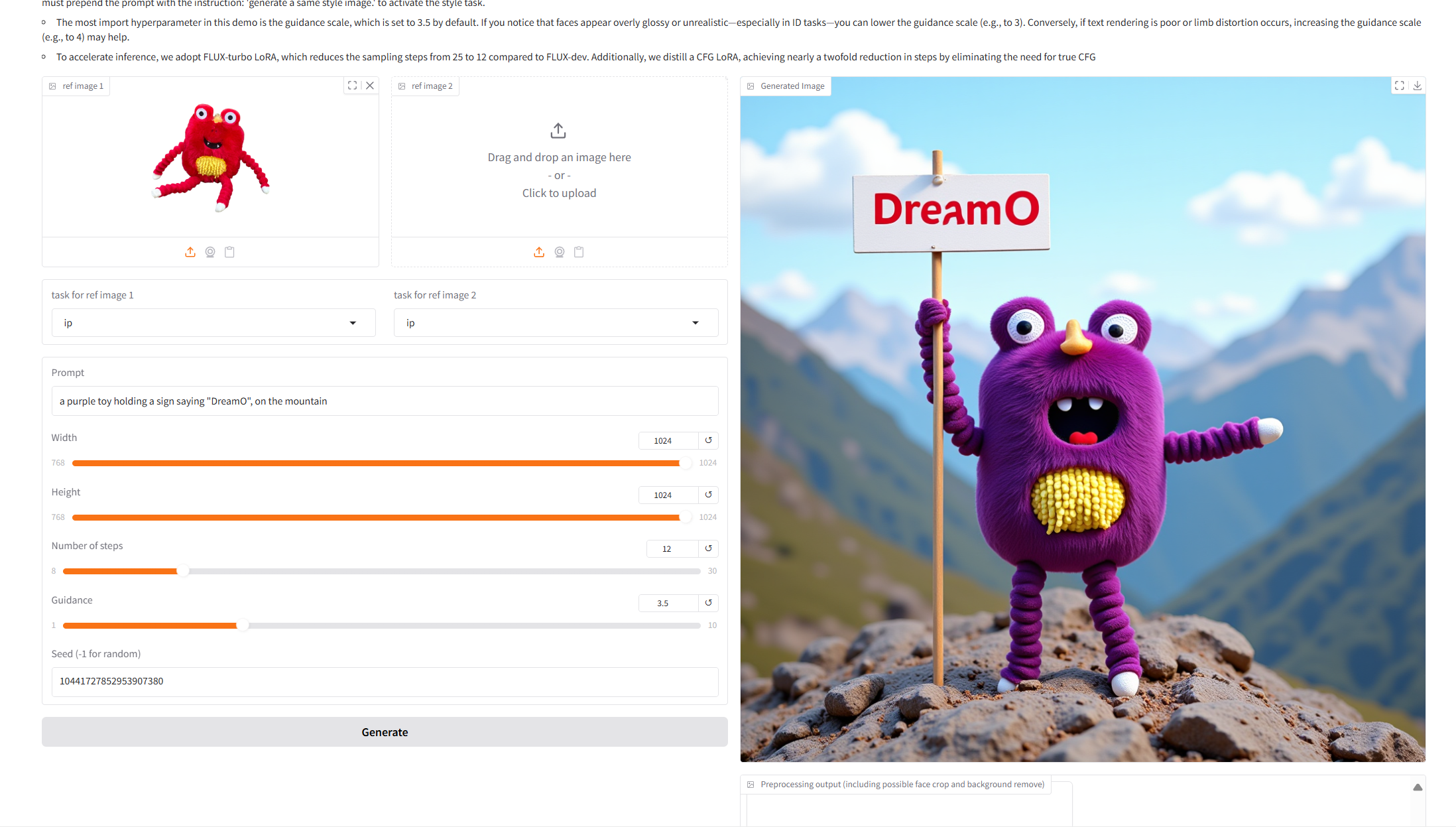
2. Project Examples
3. Operation steps
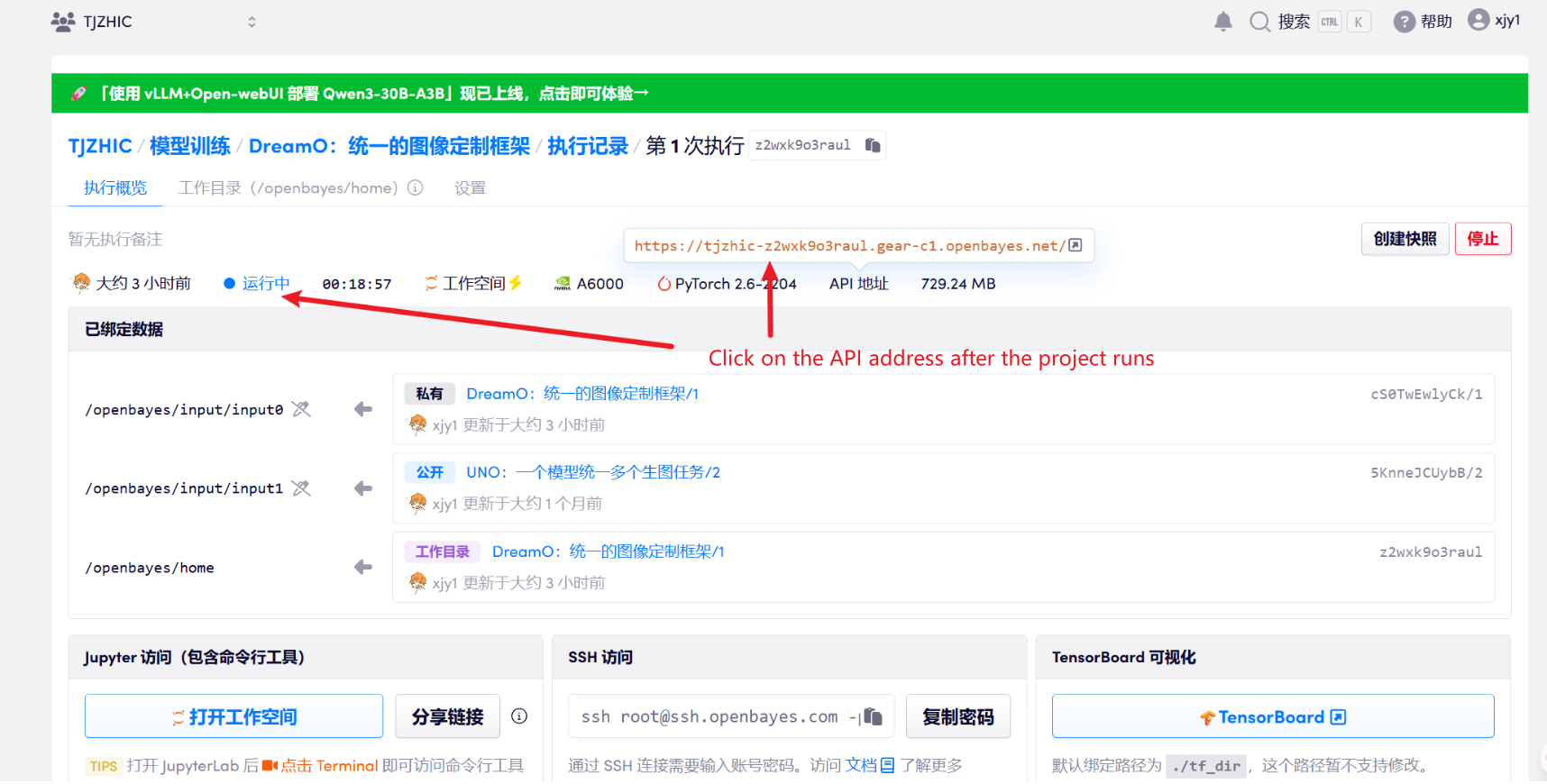
1. After starting the container, click the API address to enter the Web interface
If "Bad Gateway" is displayed, it means the model is initializing. Since the model is large, please wait about 1-2 minutes and refresh the page.
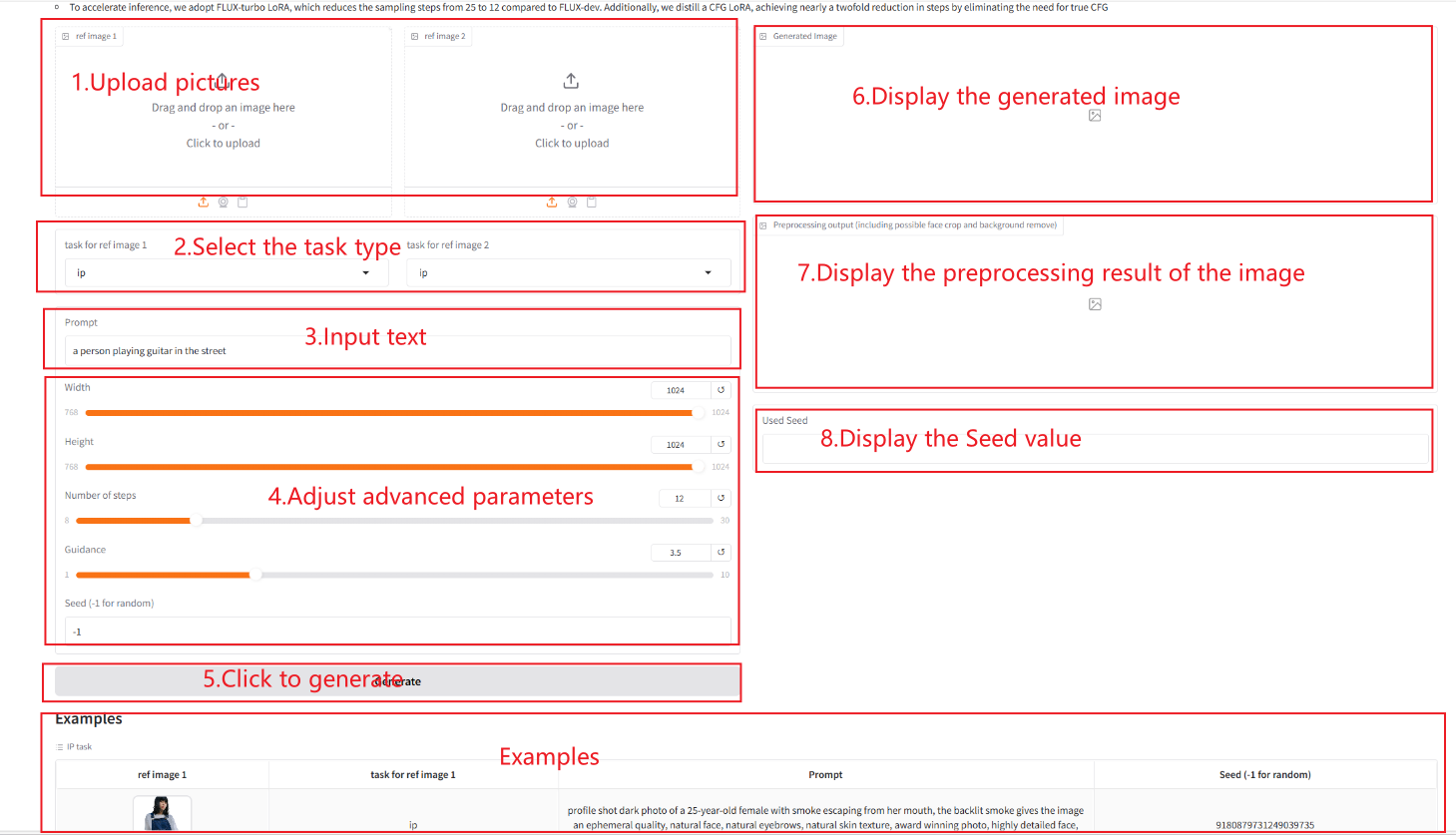
2. After entering the webpage, you can start a conversation with the model
Parameter Description:
task:
ip: Automatically remove the background of the input image and retain the main body of the object/character. Suitable for scenes such as clothing and objects.
id: Accurately extract facial feature areas and support identity feature migration. Based on the optimized facial recognition algorithm, it can adapt to portraits of different angles and lighting conditions.
style: You need to add the "Generate an image of the same style" command before the prompt. The system will inherit the original background and visual style, and achieve creative extension of the composition elements.
Width: Used to control the width of the generated image.
Height: Used to control the height of the generated image.
Guidance: It is used to control the influence of conditional input (such as text or image) on the generated results in the generative model. A higher guidance value will make the generated results closer to the input conditions, while a lower value will retain more randomness.
Number of Steps: Indicates the number of iterations of the model or the number of steps in the inference process, representing the number of optimization steps the model uses to produce the result. A higher number of steps generally produces more refined results, but may increase the computation time.
Seed: The random number seed is used to control the randomness of the generation process. The same Seed value can generate the same results (provided that other parameters are the same), which is very important in reproducing the results.
How to use
4. Discussion
🖌️ If you see a high-quality project, please leave a message in the background to recommend it! In addition, we have also established a tutorial exchange group. Welcome friends to scan the QR code and remark [SD Tutorial] to join the group to discuss various technical issues and share application effects↓
This notebook is contributed by community users and is intended for educational and informational purposes only. If any content involves copyright infringement, please contact us at support@hyper.ai for prompt review and removal.
Build AI with AI
From idea to launch — accelerate your AI development with free AI co-coding, out-of-the-box environment and best price of GPUs.
An error occurred in the Server Components render. The specific message is omitted in production builds to avoid leaking sensitive details. A digest property is included on this error instance which may provide additional details about the nature of the error.
Failed to load notebook details
1. Tutorial Introduction
DreamO is a unified image customization framework launched on May 12, 2025, by ByteDance in collaboration with the School of Electronic and Computer Engineering, Peking University Shenzhen Graduate School. Based on the DiT (Diffusion Transformer) architecture, the project integrates various image generation tasks, supporting complex functions such as character swapping (IP), face swapping (ID), style transfer, and multi-subject combination, achieving multi-condition control through a single model. Related research papers are available. DreamO: A Unified Framework for Image Customization .
This tutorial uses resources for a single card A6000.
2. Project Examples
3. Operation steps
1. After starting the container, click the API address to enter the Web interface
If "Bad Gateway" is displayed, it means the model is initializing. Since the model is large, please wait about 1-2 minutes and refresh the page.
2. After entering the webpage, you can start a conversation with the model
Parameter Description:
task:
ip: Automatically remove the background of the input image and retain the main body of the object/character. Suitable for scenes such as clothing and objects.
id: Accurately extract facial feature areas and support identity feature migration. Based on the optimized facial recognition algorithm, it can adapt to portraits of different angles and lighting conditions.
style: You need to add the "Generate an image of the same style" command before the prompt. The system will inherit the original background and visual style, and achieve creative extension of the composition elements.
Width: Used to control the width of the generated image.
Height: Used to control the height of the generated image.
Guidance: It is used to control the influence of conditional input (such as text or image) on the generated results in the generative model. A higher guidance value will make the generated results closer to the input conditions, while a lower value will retain more randomness.
Number of Steps: Indicates the number of iterations of the model or the number of steps in the inference process, representing the number of optimization steps the model uses to produce the result. A higher number of steps generally produces more refined results, but may increase the computation time.
Seed: The random number seed is used to control the randomness of the generation process. The same Seed value can generate the same results (provided that other parameters are the same), which is very important in reproducing the results.
How to use
4. Discussion
🖌️ If you see a high-quality project, please leave a message in the background to recommend it! In addition, we have also established a tutorial exchange group. Welcome friends to scan the QR code and remark [SD Tutorial] to join the group to discuss various technical issues and share application effects↓
This notebook is contributed by community users and is intended for educational and informational purposes only. If any content involves copyright infringement, please contact us at support@hyper.ai for prompt review and removal.
Build AI with AI
From idea to launch — accelerate your AI development with free AI co-coding, out-of-the-box environment and best price of GPUs.