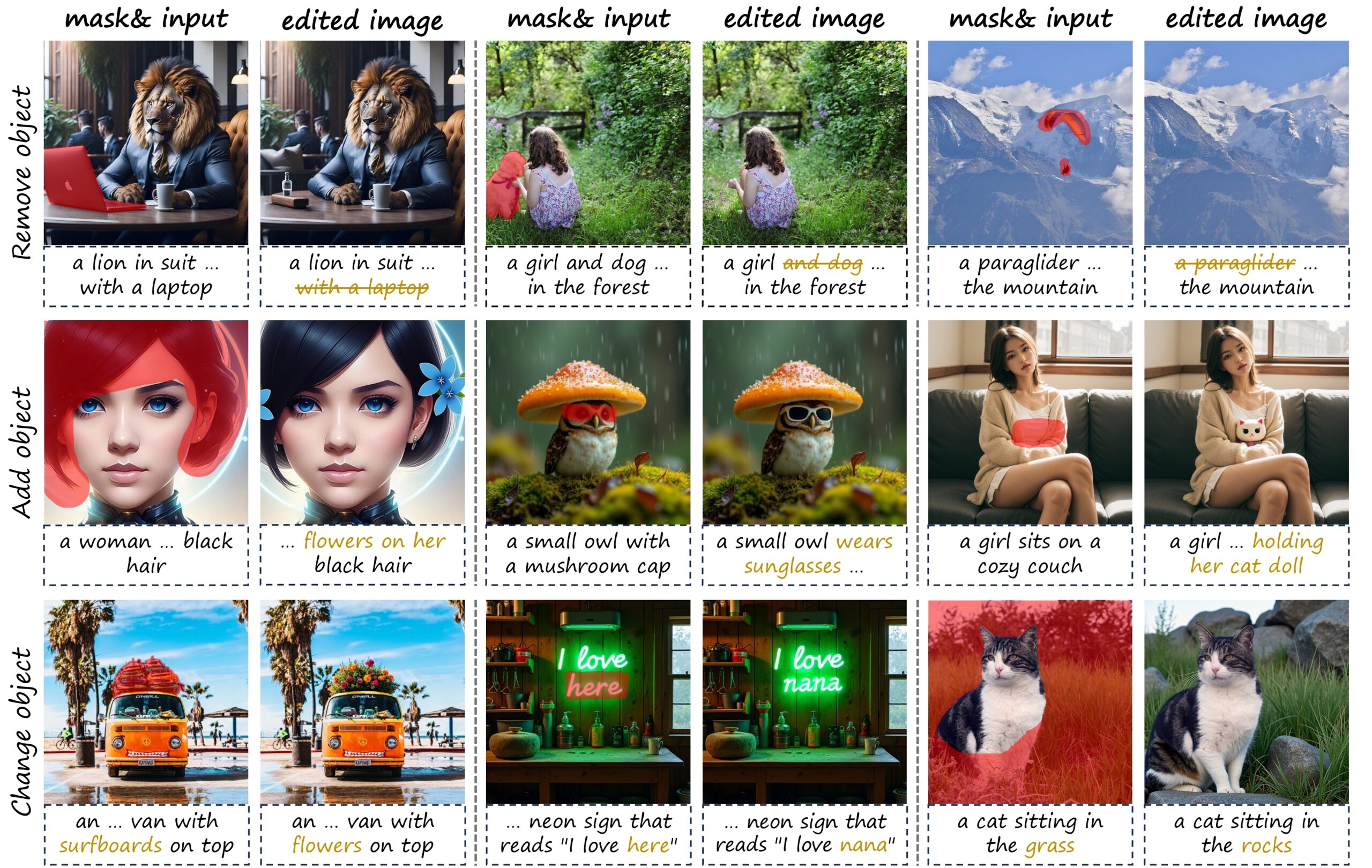
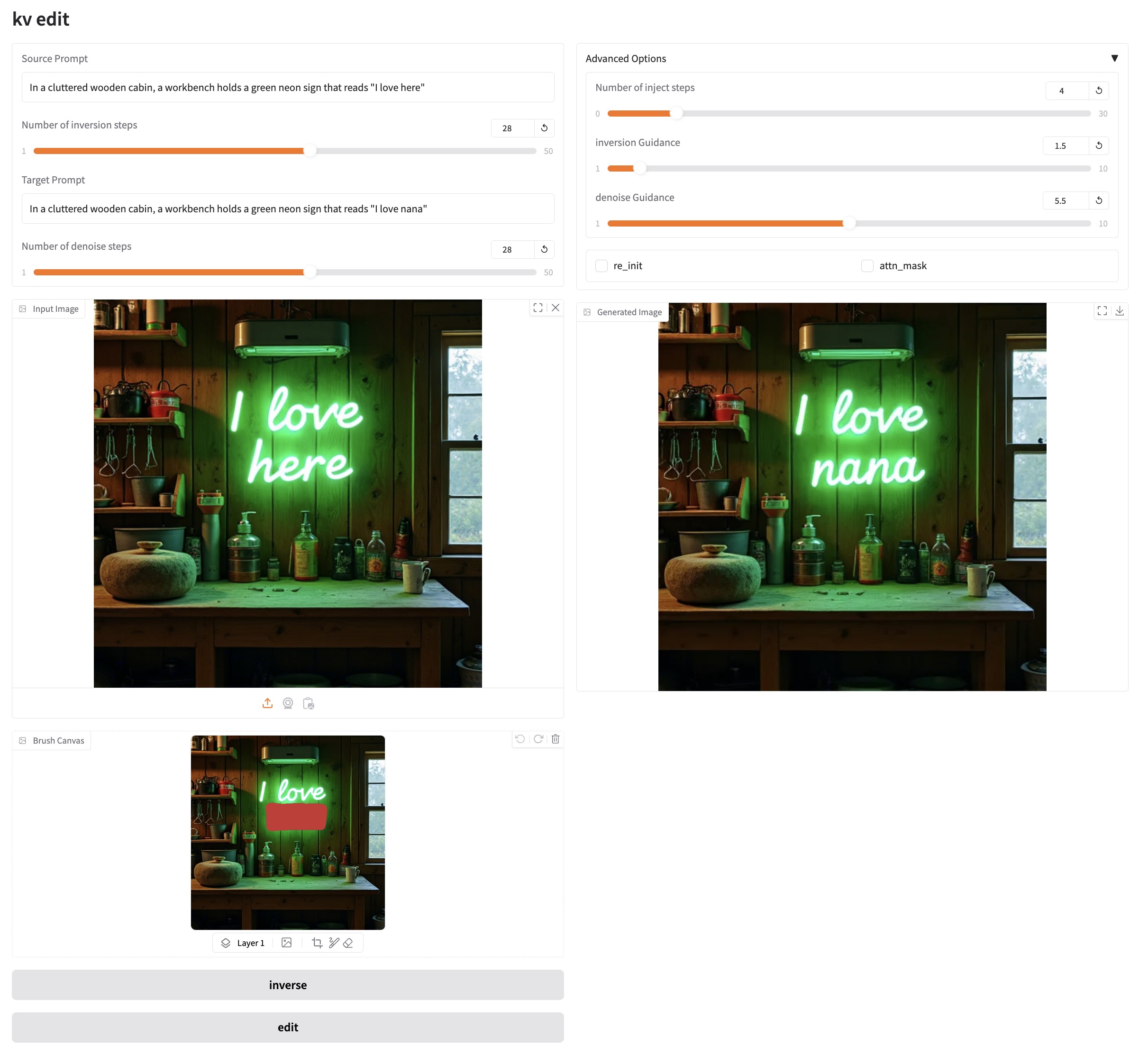
The KV-Edit project, launched by the School of Artificial Intelligence at Tsinghua University on February 25, 2025, is a training-free image editing method that rigorously maintains background consistency between the original and edited images. It achieves impressive performance on various editing tasks, including object addition, removal, and replacement. The core of KV-Edit lies in utilizing a key-value cache to store key-value pairs labeled with the background. These key-value pairs are preserved during image inversion, and during the denoising stage, they are combined with foreground content to generate new content seamlessly integrated with the background. This approach avoids complex mechanisms or expensive training requirements while ensuring background consistency and overall image quality. Related paper results are as follows: KV-Edit: Training-Free Image Editing for Precise Background Preservation .
This tutorial uses resources for a single card A6000.
👉 The project provides two models of models:
black-forest-labs/FLUX.1-dev: FLUX.1 [dev] is a 12 billion parameter rectified stream transformer capable of generating images from text descriptions.
black-forest-labs/FLUX.1-schnell: FLUX.1 [schnell] is a 12 billion parameter rectified flow transformer capable of generating images from text descriptions.
Project Examples
2. Operation steps
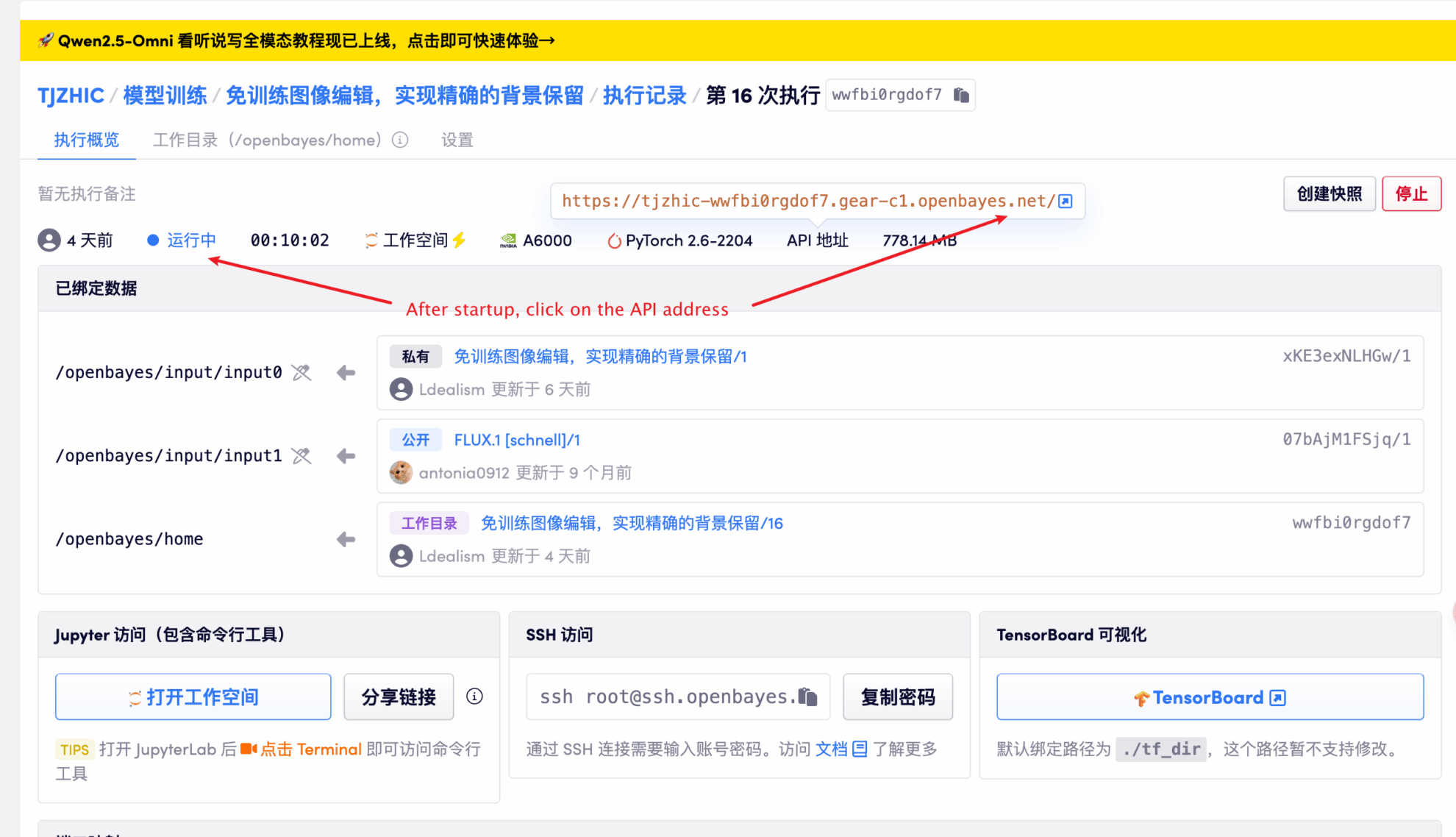
1. After starting the container, click the API address to enter the Web interface
If "Bad Gateway" is displayed, it means the model is initializing. Since the model is large, please wait about 1-2 minutes and refresh the page.
2. After entering the webpage, you can start a conversation with the model
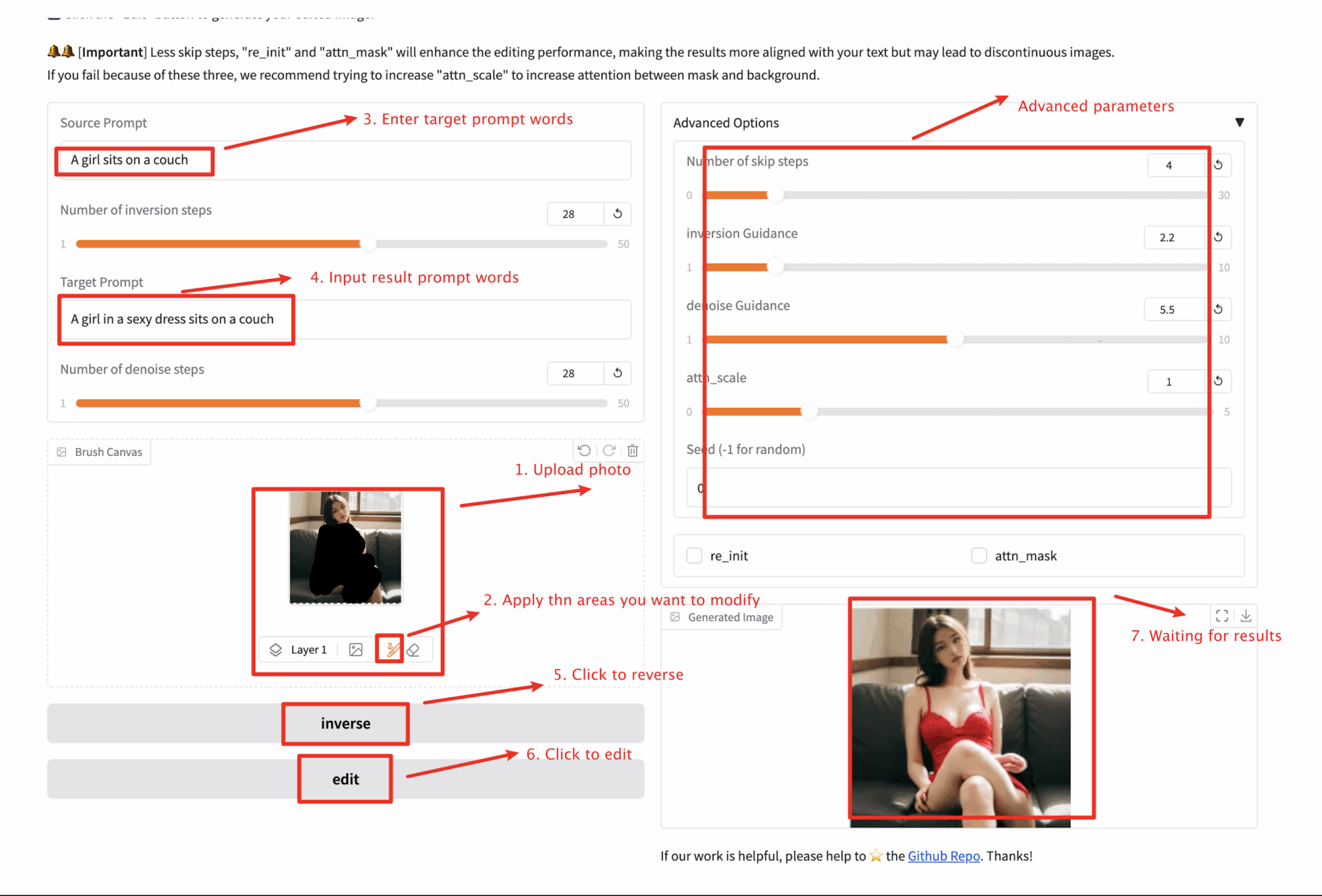
Steps: 1️⃣ Upload the picture you want to edit. 2️⃣ Fill in your source cue word and click the "inverse" button to perform the image inversion. 3️⃣ Use the Brush Tool to paint over your mask area. 4️⃣ Fill in your target cue and adjust the hyperparameters. 5️⃣ Click the "Edit" button to generate your edited image.
❗️Important usage tips:
Images cannot exceed 100 KB.
When using the inversion-based version, you only need to invert each image once, and can then repeat steps 3-5 for multiple editing attempts!
re_init means to generate new content using image mixing with noise instead of the inverted result.
When the attn_mask option is checked, a mask needs to be entered before the inversion is done.
When the mask is large and fewer skip steps or re_init are used, the content of the masked area may be discontinuous with the background. You can try increasing attn_scale.
inverse means inversion, and edit means editing to remove the background.
Number of skip steps controls the number of skip steps.
🖌️ If you see a high-quality project, please leave a message in the background to recommend it! In addition, we have also established a tutorial exchange group. Welcome friends to scan the QR code and remark [SD Tutorial] to join the group to discuss various technical issues and share application effects↓
Citation Information
Thanks to Github user zhangjunchang For the deployment of this tutorial, the project reference information is as follows:
@article{zhu2025kv,
  title={KV-Edit: Training-Free Image Editing for Precise Background Preservation},
  author={Zhu, Tianrui and Zhang, Shiyi and Shao, Jiawei and Tang, Yansong},
  journal={arXiv preprint arXiv:2502.17363},
  year={2025}
}
This notebook is contributed by community users and is intended for educational and informational purposes only. If any content involves copyright infringement, please contact us at support@hyper.ai for prompt review and removal.
Build AI with AI
From idea to launch — accelerate your AI development with free AI co-coding, out-of-the-box environment and best price of GPUs.
The KV-Edit project, launched by the School of Artificial Intelligence at Tsinghua University on February 25, 2025, is a training-free image editing method that rigorously maintains background consistency between the original and edited images. It achieves impressive performance on various editing tasks, including object addition, removal, and replacement. The core of KV-Edit lies in utilizing a key-value cache to store key-value pairs labeled with the background. These key-value pairs are preserved during image inversion, and during the denoising stage, they are combined with foreground content to generate new content seamlessly integrated with the background. This approach avoids complex mechanisms or expensive training requirements while ensuring background consistency and overall image quality. Related paper results are as follows: KV-Edit: Training-Free Image Editing for Precise Background Preservation .
This tutorial uses resources for a single card A6000.
👉 The project provides two models of models:
black-forest-labs/FLUX.1-dev: FLUX.1 [dev] is a 12 billion parameter rectified stream transformer capable of generating images from text descriptions.
black-forest-labs/FLUX.1-schnell: FLUX.1 [schnell] is a 12 billion parameter rectified flow transformer capable of generating images from text descriptions.
Project Examples
2. Operation steps
1. After starting the container, click the API address to enter the Web interface
If "Bad Gateway" is displayed, it means the model is initializing. Since the model is large, please wait about 1-2 minutes and refresh the page.
2. After entering the webpage, you can start a conversation with the model
Steps: 1️⃣ Upload the picture you want to edit. 2️⃣ Fill in your source cue word and click the "inverse" button to perform the image inversion. 3️⃣ Use the Brush Tool to paint over your mask area. 4️⃣ Fill in your target cue and adjust the hyperparameters. 5️⃣ Click the "Edit" button to generate your edited image.
❗️Important usage tips:
Images cannot exceed 100 KB.
When using the inversion-based version, you only need to invert each image once, and can then repeat steps 3-5 for multiple editing attempts!
re_init means to generate new content using image mixing with noise instead of the inverted result.
When the attn_mask option is checked, a mask needs to be entered before the inversion is done.
When the mask is large and fewer skip steps or re_init are used, the content of the masked area may be discontinuous with the background. You can try increasing attn_scale.
inverse means inversion, and edit means editing to remove the background.
Number of skip steps controls the number of skip steps.
🖌️ If you see a high-quality project, please leave a message in the background to recommend it! In addition, we have also established a tutorial exchange group. Welcome friends to scan the QR code and remark [SD Tutorial] to join the group to discuss various technical issues and share application effects↓
Citation Information
Thanks to Github user zhangjunchang For the deployment of this tutorial, the project reference information is as follows:
@article{zhu2025kv,
  title={KV-Edit: Training-Free Image Editing for Precise Background Preservation},
  author={Zhu, Tianrui and Zhang, Shiyi and Shao, Jiawei and Tang, Yansong},
  journal={arXiv preprint arXiv:2502.17363},
  year={2025}
}
This notebook is contributed by community users and is intended for educational and informational purposes only. If any content involves copyright infringement, please contact us at support@hyper.ai for prompt review and removal.
Build AI with AI
From idea to launch — accelerate your AI development with free AI co-coding, out-of-the-box environment and best price of GPUs.